
SixFifty · 2026
AI Interaction Framework
We bolted on and bandaided until we needed a system. So I wrote one. The AI patterns the SixFifty team still designs against.
- Tags
- AI · Framework · Design System
Overview
A documented system for how AI shows up across the SixFifty product. Four surfaces, ordered from lightest to heaviest, and one rule for how they connect. Nobody asked for it. It started as a Figjam jotted down between other work, and it’s now the basis for the entire AI platform SixFifty is building.
The Problem
AI features were getting bolted on left and right. SixFifty is in the middle of becoming a fully AI-driven HR platform, and you can't make that transition if you can't even agree on what an AI feature looks like in your own UI.
No shared patterns
Different teams were solving the same UX questions in different ways. The same problem got a new answer every time someone touched it.
No map
There was no central place that defined what we should be using when. Nobody could point at a doc and say “this is how AI works here.”
Overlay hell
The worst offenders were heavy AI overlays that covered the exact content the user was trying to work with.
I just started writing it
Nobody asked me to do this. I saw the chaos coming and figured someone needed to put a stake in the ground before AI patterns got even more fragmented. It started as a Figjam I jotted down between other work, and it kept getting longer because the gaps kept getting more obvious.
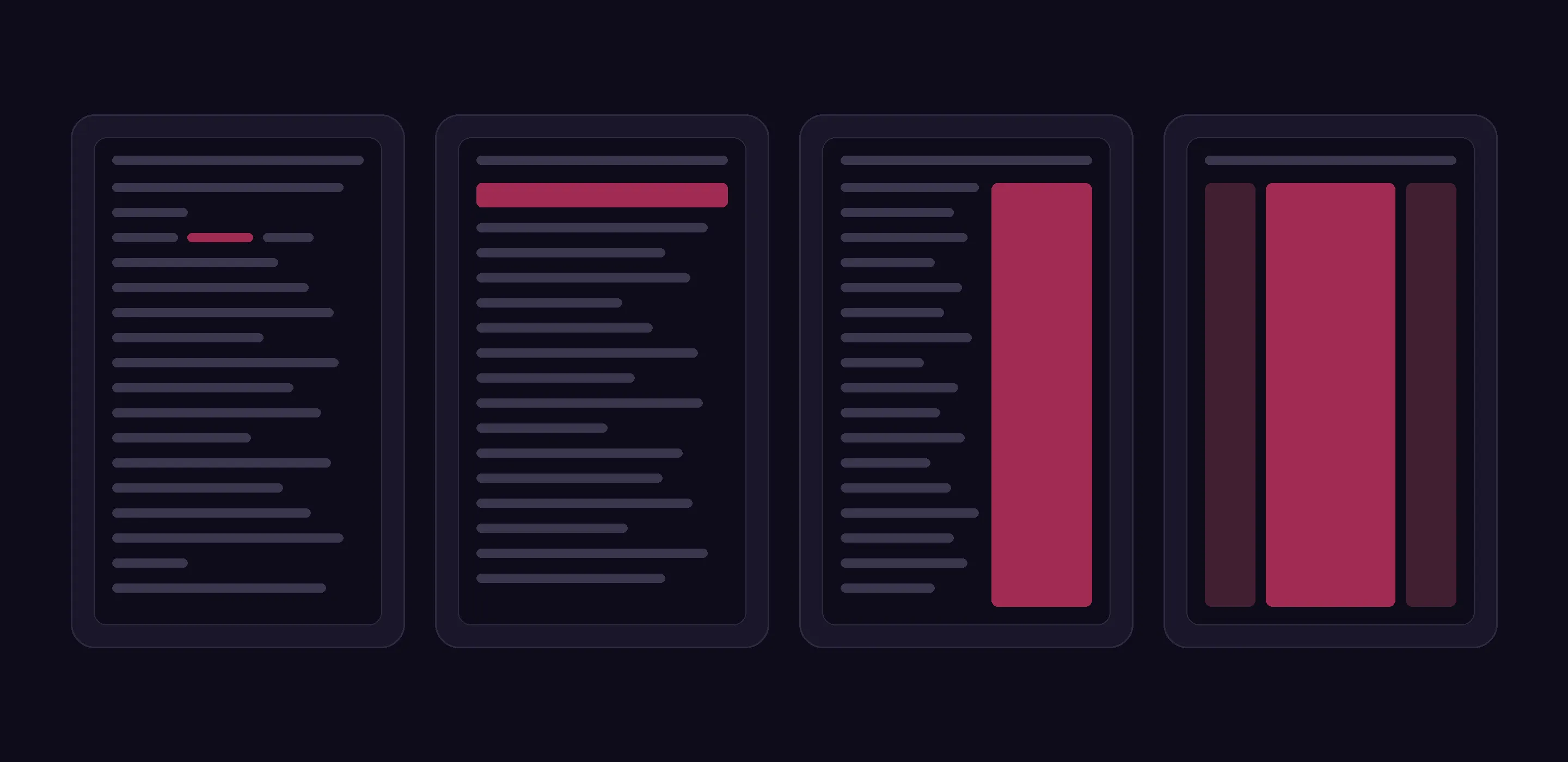
The framework defines four AI surfaces. That’s it. It’s deliberately not about loading states, streaming, error handling, or any of the deeper interaction mechanics. It’s about where AI shows up.
Once you know which surface a feature belongs in, the rest of the design conversation gets ten times easier.
The four surfaces
Exactly four surfaces, ordered from lightest to heaviest. Each has a clear job.
Inline AI
The smallest surface. Lives directly inside an existing UI element. Used for atomic actions on a paragraph or less, where the AI does one thing to one piece of content and then gets out of the way. No new real estate, no context switch.
Examples
- Rename a chunk
- Reorder documents
Banner AI
A search-style bar under the top nav. The entry point. A user types intent, and the bar kicks off whatever agent is needed. Single-line answers stay here. Anything longer opens a sidecar. It’s the door, not the room.
Examples
- Search bar
Sidecar
Slides in from the side and pushes the page content rather than covering it. Conversational, and where most agent work actually happens. The user keeps working in the rest of the app, and can expand to fullpage if the task grows.
Examples
- Ask about a document
- Manage contacts
- Job description generation
Fullpage
Center conversation, left and right rails for tasks, generated documents, and history. Used when the AI conversation is the task, not a side concern.
Examples
- Ask AI page
- Hire in a new jurisdiction
How they connect
There’s one rule for how the surfaces relate.
Bars open sidecars. Sidecars open windows.
The escalation rule
That’s the whole escalation logic. A user starts in the lightest surface and only moves to a heavier one as the task gets bigger. The framework isn’t four boxes sitting next to each other. It’s a path.
What I cut
The product had a bunch of overlay-style AI surfaces that covered the content underneath. Those went.
Pushing respects
A sidecar pushes the page aside. The user’s work stays visible and usable the whole time the AI is helping.
Replacing respects
Fullpage replaces the view entirely. An honest trade: the conversation is the task now, and the UI says so.
Covering doesn't
An opaque panel on top of someone’s work isn’t help, it’s an interruption with good intentions. Off the table entirely.
That cut alone tightened the rest of the framework. Once “drop a panel on top” is off the table, you’re forced into clearer choices about where AI actually belongs.
Where it lives now
This started as a one-person opinion in a Figjam. Now the team uses it on a daily basis. Every AI feature we build gets placed into one of these four surfaces and follows the bars-to-sidecars-to-windows path before any deeper design work starts.
That matters because SixFifty is making the whole platform agentic. As AI moves from a set of features to the way the product works, this framework is the load-bearing piece that keeps every new surface decision consistent instead of renegotiated from scratch.
Why do this without being asked? Documentation like this rarely gets prioritized until the lack of it has already cost a team six months. By the time someone says “we need a framework for this,” the inconsistency is already shipped, and now you’re writing the doc and untangling the mess at the same time.
I’d rather write the doc first.
Next case study
Design System
Nobody asked for it. I had to fight to build it. 50+ components with full token architecture, and every feature now ships on it.