
SixFifty · 2025
Design System
Nobody asked for it. I had to fight to build it. 50+ components with full token architecture, and every feature now ships on it.
- Tags
- Design System · Figma · React
Overview
Built a 50+ component design system from scratch. A Figma library, tokenized React components, and a real working bridge between design and engineering. What used to be three different greys and two button heights is now one source of truth that designers, PMs, and engineers all build from.
The Problem
When I started this, “the design system” was a single Figma file with a handful of rough components. They weren’t actually Components in Figma, just shapes that designers copied and pasted into new screens. The devs had their own React components on their side. The two didn’t talk to each other.
There were no tokens. No source of truth for color, type, or spacing. Designers did their own thing, devs tried to match it, and stuff drifted further apart with every new feature. I’d open two different screens in the app and find three different greys, two button heights that were almost but not quite the same, and a header style that depended on whichever designer touched it last.
It was the kind of slow rot that doesn’t show up on a sprint board. It just makes everything take longer.
The pitch nobody asked for
Leadership did not ask for a design system. When I brought it up, they actively pushed back. The designer before me had been fired in part because leadership didn’t love how the product looked, and pitching a “let’s rebuild the foundations” project right out of the gate sounded like a long detour from real work. Their specific worry was that this would mean pausing features to go rebuild plumbing, which was a non-starter.
So I sold a different version of it. The pitch was that we’d build the system as we went. No stop on roadmap work. We’d ship the components we needed for upcoming features, swap the old ones out in the codebase opportunistically, and let the system grow alongside the product instead of in front of it.
The thing that actually turned it was the devs. They were begging for this. A group of them volunteered to put an hour or two of their week into helping build components and replace the old code, on their own time. That changed the conversation. Once leadership saw engineering actively pushing for this rather than tolerating it, they greenlit it. I was upfront that the real payoff was months out, not weeks, and we moved.
Stakeholder interviews first
Before drawing a single component, I sat down with every stakeholder one by one. Engineering leads, product, marketing, the exec team. I asked each of them the same three questions, and the last one was the most important. The designer before me got fired because leadership didn't like how the product looked, and I wanted to know exactly what 'looked bad' meant before I committed to a direction.
Look and feel
What does the look and feel of the product mean to you? Some answers were specific. Some were vibes. Both were useful.
Mission in the UI
How does our company mission show up in the UI and UX? Forced people to connect what we say we’re about to what users actually see and touch.
What bugs you
What about the current design bugs you? The complaints I needed to hear before drawing anything. Specific or vague, all of it landed.
Building it
I drove the design side end to end. A junior designer on the team helped me build a chunk of the Figma components, but the architecture, naming, tokens, and the push into code were all me.
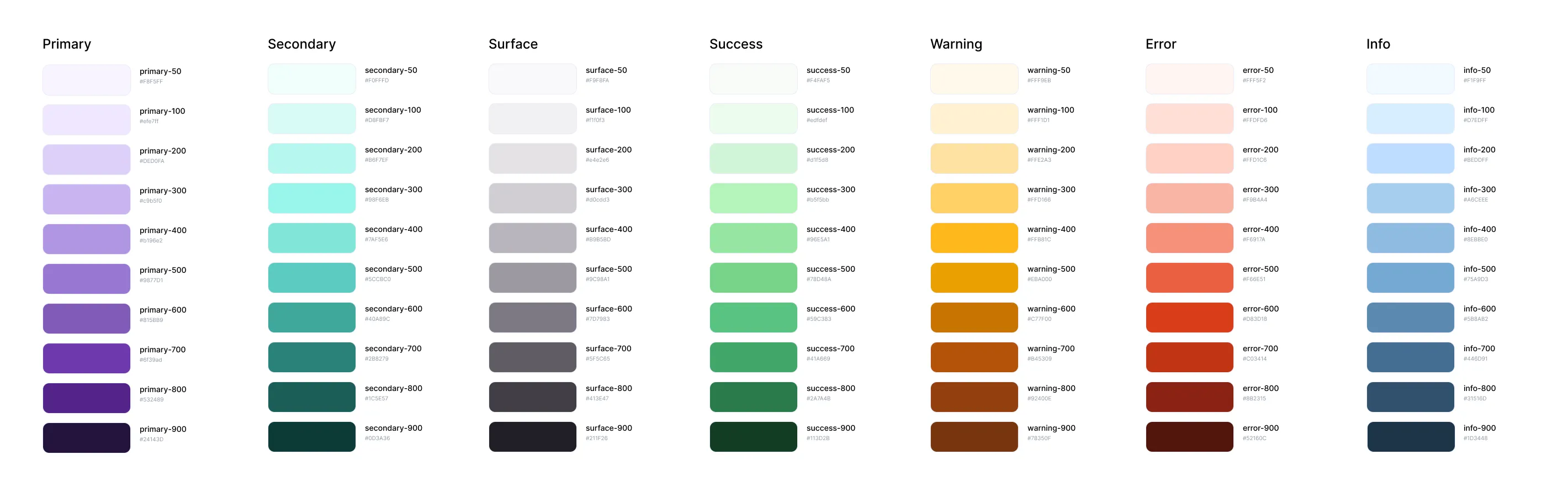
I started with the foundational stuff: color, type, spacing, radius. Then primitive components like buttons, inputs, selects. Then the composed pieces, forms, cards, modals. Then the heavier patterns. Boring order, but it’s the right order. You can’t theme a card if you haven’t decided what a color token is yet.
Figma library
Proper Components, variants, and tokens. The primitive designers actually reach for.
React components
Built in code, mapped one-to-one with the Figma library. No drift between spec and shipped.
Tailwind
Used mostly for spacing. Keeps the markup readable and the spacing scale honest.
Token layer
Maps Figma variables to the code. Change a token, the change propagates through the app.
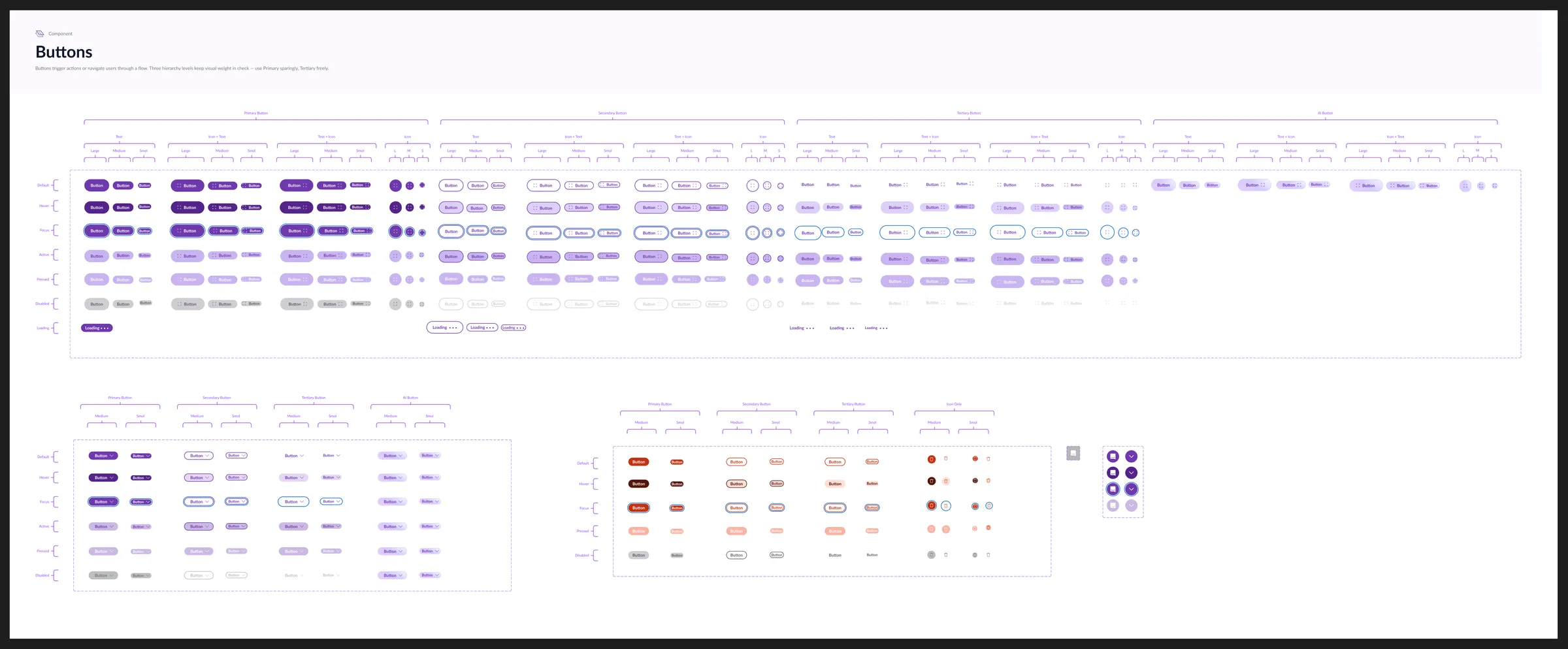
The token layer is where the bridge actually lives. Every scale is documented with its raw values and the Tailwind class that ships it, so a designer speccing text-lg / Bold and an engineer writing text-lg font-bold are pointing at the same thing.
That mapping is the difference between a design system and a sticker sheet. Without it, you are still translating by hand on every ticket.
The table
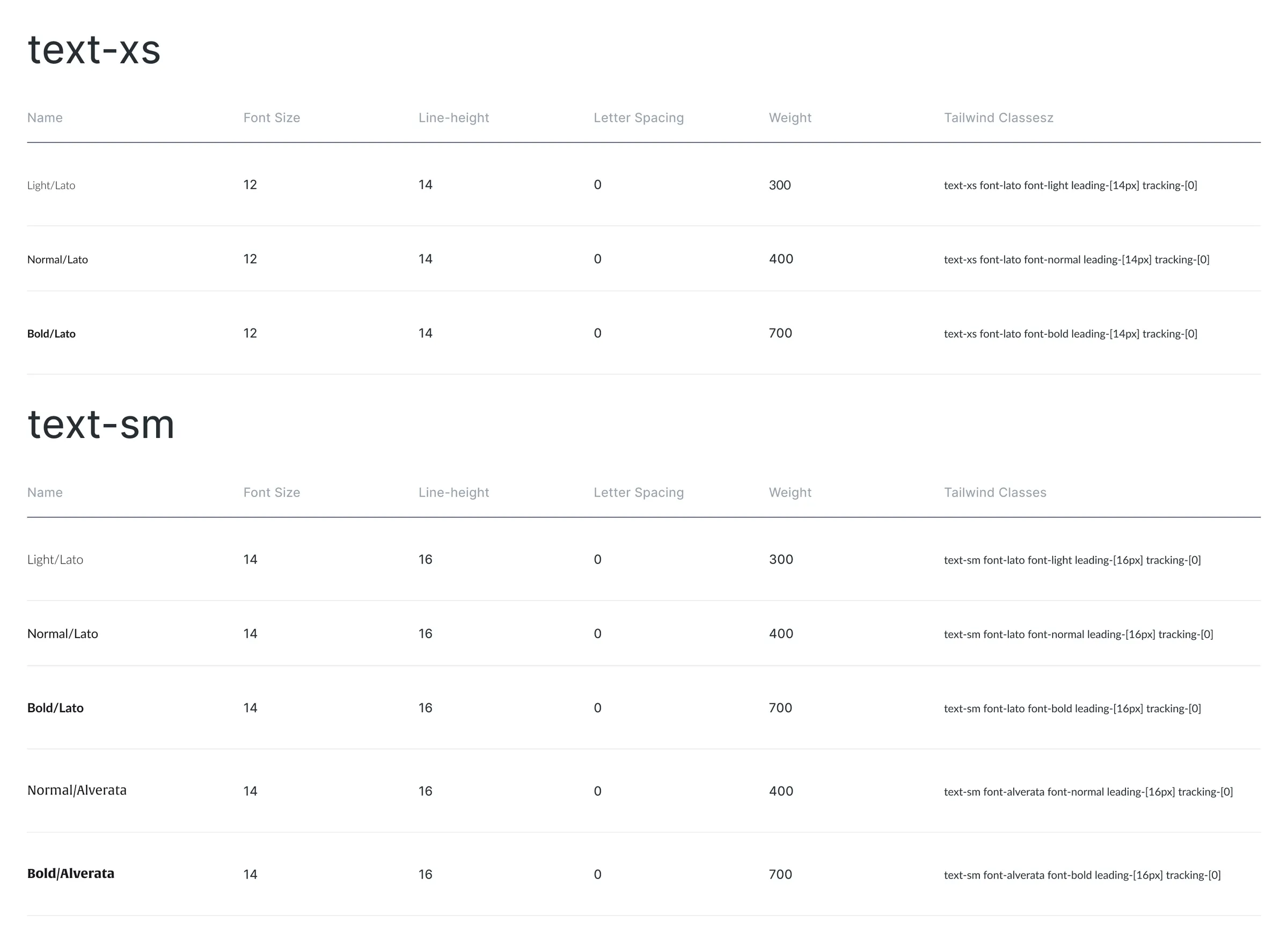
Tables are everywhere in this product. Legal docs are basically tables wearing trench coats, so the table component had to do real work, not just look good in a screenshot.
The hard part was accessibility. Most data tables on the web fall over the moment you turn on a screen reader, and side-scrolling tables are even worse. Ours had to handle a lot of columns without becoming a horizontal scroll trap.
What I landed on: the table side-scrolls like normal, but there’s a button in the top right that lets you tab through column groups instead of dragging. Keyboard users and screen reader users get a real path through the data. Mouse users still scroll if they want to.
It’s the component I’m proudest of in the system.
What was actually hard
Honestly, the hardest part wasn’t the components. It was the devs.
There were a lot of opinions and a lot of fights early on. Naming, structure, where the system should live, who got to decide when something was ready, whether tokens were even worth the overhead. I spent more time in conversations than in Figma for the first couple of months, finding common ground, defusing arguments, and getting everyone bought into the same way of working.
The system wouldn’t have shipped if I’d treated it as a design problem. Half the job was politics and trust. Once a few of the devs saw what reusable, tokenized components actually felt like to build with, the temperature dropped and things got easier.
The current state
Where it is now
50+ components shipped and adopted across every feature area at SixFifty. The three greys and two button heights collapsed to one of each. Design-to-engineering handoff shifted from “which grey did you mean?” to “which token.”
Designers spec faster. Engineering ships faster. Devs stopped grumbling about rebuilding the same components on every project. The product is finally consistent enough that you can tell two screens belong to the same app.
I’m still skeptical of design system ROI numbers that pretend to be exact. Adoption is a compound effect, not a spreadsheet line. But these outcomes are things anyone on the team can point at, which is a better proof than a made-up percentage.
There’s a next phase, closing the loop so component changes flow from design into production without anyone hand-translating them. You can check out that case study here.
Next case study
AI Features
The hard part was never the model. It was getting people to trust the answer. Ask AI shipped at 96 percent accuracy and became the most-used feature on the platform.